
Add Kick
Choose your Slack workspace and approve the installation. A confirmation page explains what to do next.
Your team. In sync.
Plans, people, and progress—together in Slack. Kick turns everyday conversations into clear next steps, without another dashboard.
Free core workflows. No separate account.
Before you install, read our privacy policy.

Small actions.
Shared momentum.
One app. The whole working week.
Start with the work in front of you. Kick’s focused forms and Home tab keep the details close to your team.
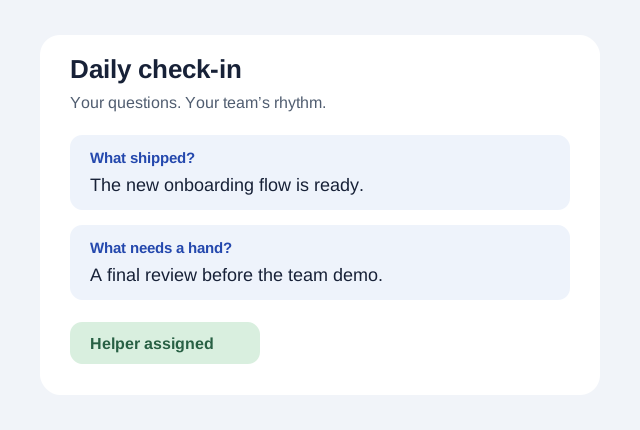
Illustrative workflow · sample data, not a Slack screenshot
/sync setupChoose your questions and schedule, flag blockers, and find someone who can help. A digest brings the responses together.
Ask ‘What shipped?’ and ‘What needs a hand?’ every weekday.
New workflows start paused. Preview and confirm before enabling.
How to use it ↗
Make the next step obvious
Give work an owner. See who has room. Keep the decision and the reason together, so the next conversation starts with context.
Keep the human part human
A thoughtful welcome. A useful one-on-one. A thank-you that doesn’t get forgotten. Make room for the moments that hold a team together.

Built for the way teams work
Use one workflow or connect several. Schedules are opt-in; your team chooses its own questions, participants and rhythm.
Delivery is checked every 15 minutes for enabled schedules and queued notices. Private reminders require installation consent and activation. Read the setup and availability guide.
Fourteen ways to get moving
All fourteen commands are published. Add help to any command, or open the same tools from Kick Home.
/syncShare an update or manage team check-ins/pickChoose teammates randomly or rotate fairly/kudosThank teammates for their contributions/coinsGive virtual recognition points, not money/todoManage private personal or shared channel tasks/pollCreate channel polls and view votes and results/reportPreview a comprehensive workflow report/planView workload, capacity, goals and issue sync/decisionRecord proposals and find team decisions/handoffAgree on handoffs between teams/approveRequest a decision or review pending requests/onboardManage onboarding checklists and buddies/oneononePrepare private agendas and follow-up actions/timeoffRequest leave and view approved team coverageStart small
Choose your Slack workspace and approve the installation. A confirmation page explains what to do next.
Make a private list with /todo mine. For shared work, run /sync setup in a public test channel and review the settings.
Choose a workflow in Kick Home. Collect updates, assign an action or preview a report with /report week. Share only when you’re ready.
Clear boundaries
Kick stores Slack identifiers, authorization and the records you submit in Neon Postgres; Vercel hosts the app. Shared workflows use 7-, 30- or 90-day retention. Personal tasks use 30 days. Private tasks, approvals, leave details and one-on-ones stay out of shared reports.
Read our privacy policy ↗Request access, an export or deletion at kick.bot.help@gmail.com. Get support.
Run check-ins, manage personal and channel tasks, vote in polls, review reports, plan capacity and goals, record decisions, and coordinate handoffs, approvals, onboarding, one-on-ones and leave. Recognition and fair picks are included too. All fourteen commands are published in Slack.
No. Install Kick in your Slack workspace and use its commands or Home tab. Core workflows are free. Optional GitHub, Jira and Linear connections require your own provider account and administrator consent.
Yes. Use /sync setup to select a template or write one to five questions, choose participants and a time zone, and set the schedule. Preview and confirm before enabling. You can run up to ten named workflows in a public channel.
Shared workflow records are limited to current channel members. Personal tasks are private to their owner. One-on-ones are limited to their two participants; approval details to requester and approver. Private records are excluded from shared reports. Read the privacy policy for the full rules.
Reports summarize retained records for one workflow over a selected UTC date range of up to 90 days. Preview before sharing. Jira, Linear and GitHub issue imports and status changes are manual: an authorized administrator chooses the issue and confirms the direction. There is no background sync.
Enabled scheduled workflows and queued notices are checked every 15 minutes; delivery can be delayed by outages or backlogs. Private reminders require installation consent and activation. Quiet hours, snooze, leave and opt-out preferences keep reminders under your control.
Less chasing starts here
The work is already in Slack. Bring the next steps there, too.

Free core workflows · Privacy policy